Best Free Online Statistics Calculators Compared
Compare the best free online statistics calculators by features, normal and binomial tools, t-tests, regression, and no-login use, with an all-in-one pick.
Ap Stats Calculator
Ap Stats Calculator
A good free online statistics calculator can save hours of hand calculation, but not every free tool does the same job. Some are excellent for graphing, some focus on one test, and some require an account before they show a full result. This comparison looks at what to check before you choose, how the main types of free tools differ, and why an all-in-one calculator is often the most practical choice for AP Statistics students.
Check each tool’s current free plan before you rely on it.
What to Look for in a Free Statistics Calculator
Start with coverage. For AP Statistics, a useful tool should handle normal distribution probabilities, binomial probability, descriptive statistics, t-tests, chi-square tests, confidence intervals, and regression analysis. If a tool only does one of these, you will switch tools in the middle of homework, which wastes time and invites mistakes.
Next, check whether the tool shows its working. A result alone is not enough for learning. The best tools show the test statistic, p-value, degrees of freedom, interval bounds, and the values a teacher checks, so you can compare them with your own setup. Also check access: does it run in a browser without a download, does it require a login, and does it work on a phone as well as a laptop? A no-login tool that runs entirely in the browser is usually most convenient.
Finally, check the output format. Clear charts help, especially a shaded normal curve for normalcdf problems, bars for binomial problems, and a scatter plot with a regression line. A tool that only returns a decimal, with no chart and no intermediate values, is harder to learn from and harder to check.
Graphing Tools: Desmos and GeoGebra
Desmos is widely known as a free graphing calculator, and it is excellent for plotting functions, exploring a normal curve, and building scatter plots with sliders. Students like its clean graphs and its ability to show how changing a value changes a picture. For AP Statistics, Desmos is a strong visual companion, especially for exploring data and regression lines.
GeoGebra offers similar strength: free graphing, geometry, and statistics tools in one environment, with classroom materials and interactive applets. Both tools are powerful, but neither is designed as a single AP Statistics test menu in the way a TI-84 Plus is. You may need to build a calculation yourself, rather than opening a ready-made t-test or chi-square test menu, and that extra setup matters when working through many homework problems.
Single-Purpose and General Math Tools
Many free websites focus on one calculation, such as a z-score calculator, a confidence interval calculator, or a binomial probability calculator. These can be accurate and fast for that one job, and they are useful when you only need a single value. The drawback is fragmentation: homework needing normal, binomial, t-test, and regression work may need four different websites, each with its own layout and input style.
General math tools, including large symbolic calculators with free tiers, can handle statistical formulas, but they are not always built around AP Statistics workflows. They may return a result without the AP-style output students need, such as degrees of freedom or a clear p-value, and some features may sit behind a paid tier. They are still useful for checking a tricky calculation, but not always the fastest route for a full assignment.
All-in-One Statistics Calculators
All-in-one statistics calculators put the main AP Statistics tools in one place: normal distribution, binomial probability, t-test, z-score, chi-square test, linear regression, confidence intervals, descriptive statistics, and probability. The advantage is consistency. Once you learn one layout, every tool works the same way, and you can move from a normal problem to a t-test without relearning a new site.
This is where Ap Stats Calculator fits. It is designed as a free, all-in-one tool for AP Statistics, with core functions, step-by-step results, and visual charts, all in the browser with no login required. That combination matters for students who want to check homework quickly, verify a p-value, or study probability distributions without signing up for another account.
Feature Comparison at a Glance
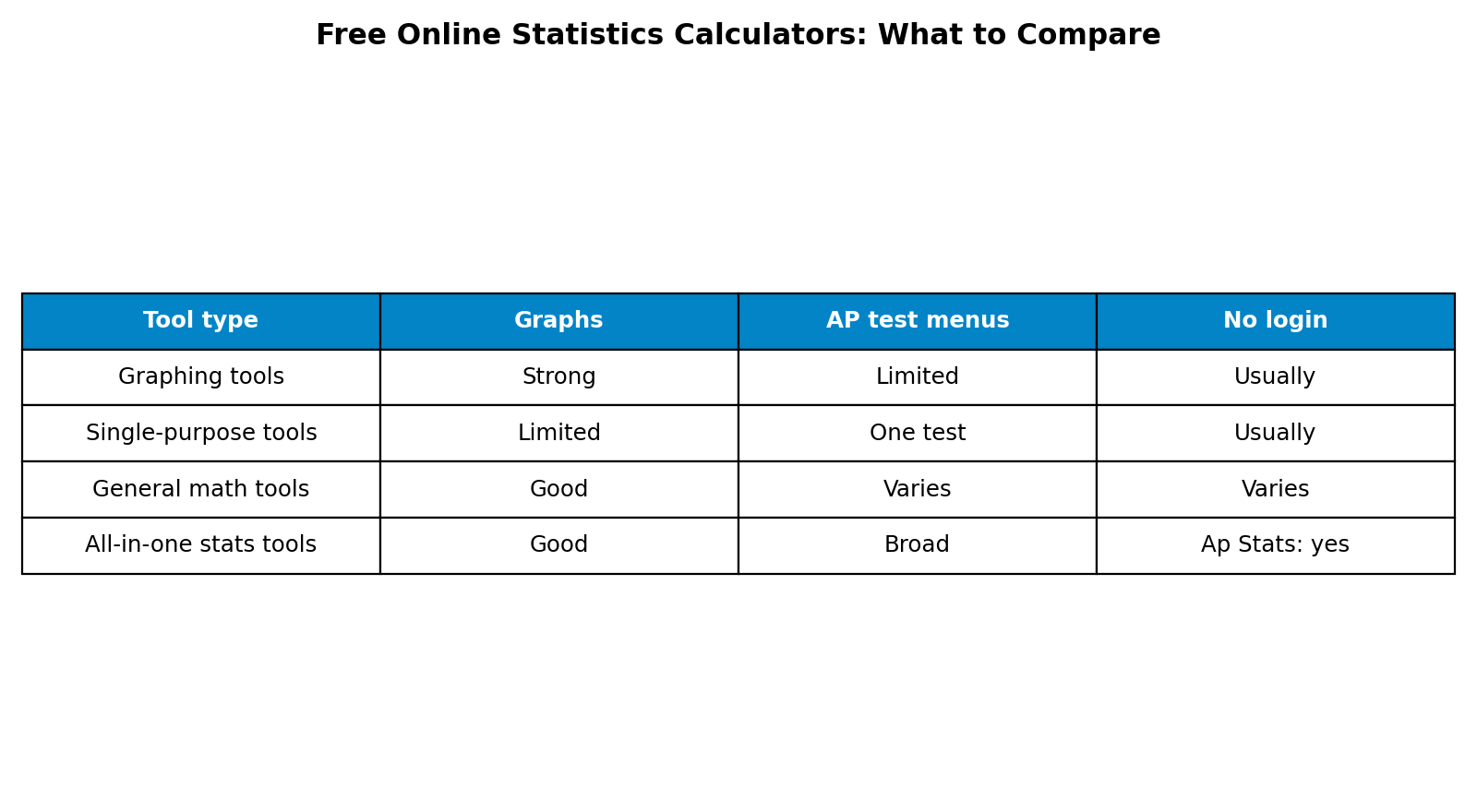
Graphing tools such as Desmos and GeoGebra offer strong visuals and free access, with statistics features that are powerful but less focused on AP test menus. Single-purpose calculators offer speed for one calculation, but limited coverage. General math tools offer breadth across mathematics, but AP-style statistical output varies. All-in-one statistics calculators, including Ap Stats Calculator, offer the broadest AP Statistics coverage in one place, with charts and step-by-step output, and no login in the case of Ap Stats Calculator.
Match the tool to the task: graphing tools for exploring curves, single-purpose calculators for one value, and all-in-one calculators for a homework set or test revision.
Which Free Calculator Should You Use?
For most AP Statistics students, an all-in-one calculator is the best starting point, because it covers the course from normal distribution through regression analysis without switching sites. Add a graphing tool when you want to explore a curve or build a custom graph, and keep your TI-84 Plus or TI-Nspire skills sharp for exam day, since phones and laptops are not allowed on the AP Statistics exam.
Also think about privacy and convenience. A tool that runs in your browser without an account avoids another password and keeps practice data on your own device.
Frequently Asked Questions
What is the best free online statistics calculator?
The best choice depends on your task, but for AP Statistics homework, an all-in-one calculator covering normal and binomial tools, t-tests, chi-square tests, confidence intervals, and regression, with charts and no login, is usually most practical. Ap Stats Calculator is built for exactly that use.
Do free online calculators work for AP Statistics exam prep?
Yes, for practice at home. They help you check answers, learn calculator output, and revise procedures. On exam day itself, only an approved graphing calculator is allowed, so also practise the TI-84 Plus or TI-Nspire menus you will use in the exam room.
Are free statistics calculators accurate?
Reputable calculators use standard statistical formulas and should agree with a graphing calculator to normal rounding. If two tools disagree, check inputs first, especially mean, standard deviation, degrees of freedom, and whether you chose a one-sided or two-sided test.
Do I need to create an account to use Ap Stats Calculator?
No. Ap Stats Calculator runs in your browser with no login required, so you can open it, enter your numbers, and read the result and chart at once.
Conclusion
Free online statistics calculators differ in coverage, output, and convenience. Graphing tools are excellent for visuals, single-purpose tools are fast for one job, and general math tools cover a lot of ground, but for AP Statistics, an all-in-one tool saves the most time. If you want normal and binomial probabilities, t-tests, chi-square tests, confidence intervals, and regression analysis in one place, with charts and no login, try the free Ap Stats Calculator at www.apstatscalculator.com.
AP is a trademark of the College Board, which was not involved in the production of this site.